
Equipment purchasing
Machine software licenses: what a Hawaii buyer should receive
A supplier’s quotation says “software included,” and the factory video shows the machine running from a laptop. Before ordering that equipment for Hawaii, turn the software license handover into a written list: the program and edition, what your purchase includes, and who can restore access if the operating computer is replaced.
Name the software and the controller it must work with
Ask the supplier to name each program needed for the intended workflow. Design software, a program that prepares job instructions, and the machine-control software may be separate items. Record the product, edition and version, along with the controller model and the computer’s operating system. Ask which items are supplied and which you must obtain separately.
For a concrete example, LightBurn’s licensing guide distinguishes Core support for GCode-based controllers from Pro support that also includes DSP and Galvo devices. The correct edition therefore depends on the controller. This example describes LightBurn’s products; it does not establish compatibility for an unnamed machine.
Have the supplier identify the manufacturer or software publisher’s compatibility information for the offered configuration. A screenshot of a familiar program leaves its edition, license status and connection to the quoted controller unresolved.
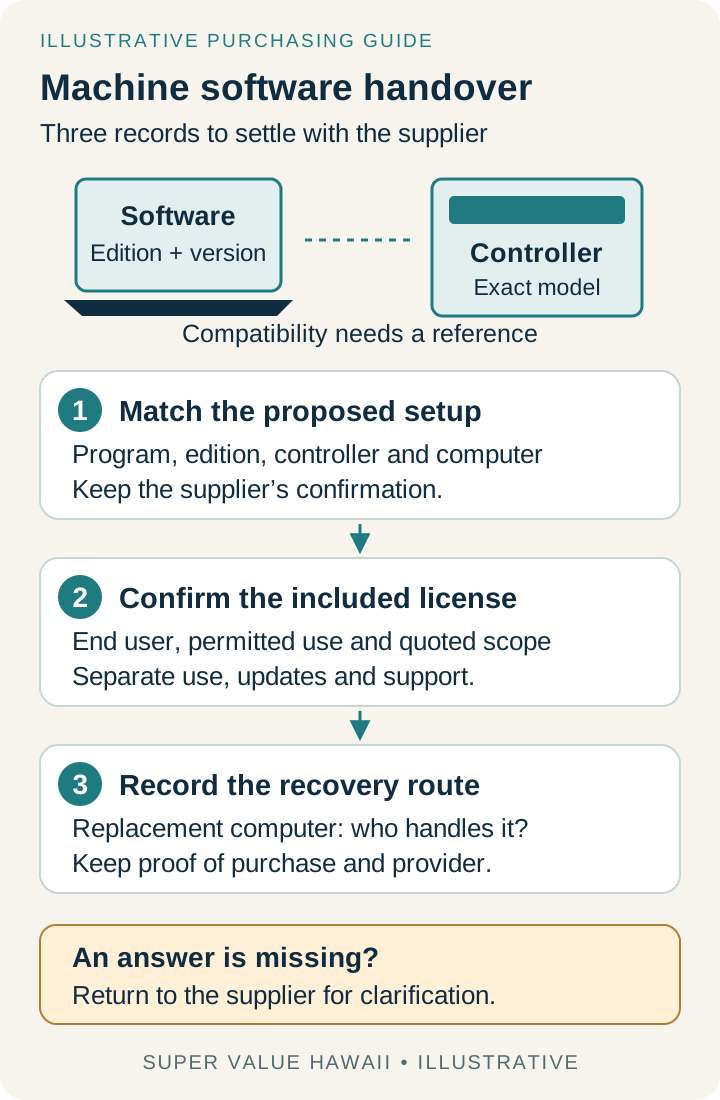
Put the included license on its own quotation line
Ask whether the offer includes a license issued for your use, a trial installation, or software that you buy separately. Record who supplies it, the licensed end user and the permitted business use, computers or machines under the applicable terms. Keep the publisher’s or authorized seller’s confirmation with the offer.
The factory may demonstrate a machine using its own computer and software arrangement. That video records the demonstration. Ask for separate evidence of what will be delivered for your business in Hawaii, including any activation file, physical license device or account setup that the actual product requires.
List plugins and optional functions separately if the supplier says they are needed for the agreed task. Ask for a complete software cost line, with anything excluded or still unquoted visible. Avoid comparing one offer’s hardware-only price with another offer that includes the required software.
Separate the right to keep using a version from update access
Ask what an expiry date refers to: continued use, updates, support or a trial. Record the start event and any renewal requirement for each applicable item. An annual update charge and a subscription required for continued operation have different consequences for a purchasing comparison.
LightBurn states that users can continue with an eligible version released within their update period, provided it is compatible with their operating system, without renewing for later updates. Use that as an example of why the distinction matters. Obtain the terms for the actual software in your offer.
Also ask how activation works at the proposed site and whether internet access is needed for activation or later use. Request the publisher’s supported procedure for the intended arrangement; leave an unanswered connectivity requirement open.
Agree the recovery route before the computer changes
Ask who will handle a replacement computer, a failed drive or a lost activation record. Identify the person or company authorized to request recovery and the purchase evidence they will need. Record the contact route without placing license keys or login details in a general comparison sheet.
Mach Support explains that Mach4 licenses are linked to a specific PC. Its guidance also distinguishes direct purchasers’ account tools from the assistance route for licenses supplied through an equipment manufacturer or distributor. For a bundled license, establish the correct route before assuming the software publisher has your purchase record.
Ask which installation files, configuration files and backups you are permitted to retain, and who will check them before restoration. Keep machine settings and revisions tied to the actual unit. Software entitlement, an available backup and a successful technical restoration are separate checks.
Keep a short handover record with the equipment order
Complete the record for the quoted configuration and retain the supplier’s answers and references. “To confirm” is useful information: it shows which part of the handover still needs a decision. Store credentials separately in an appropriate private system.
| Review item | Question to record |
|---|---|
| Programs and editions | Which named programs, editions and versions are needed for the intended work? |
| Controller and computer | Which controller and operating system are confirmed, and what compatibility reference supports them? |
| Included entitlement | Who supplies the license, for which end user and permitted use? What is separate or excluded? |
| Activation and connectivity | What supported activation arrangement and internet access, if any, are required? |
| Use, updates and support | Which periods or limits apply, when do they start, and which charges remain unquoted? |
| Replacement computer | Who can request recovery or replacement, through which provider, and with what purchase evidence? |
| Files and restoration | Which installation files and unit-specific backups may we retain, and who reviews restoration? |
| Handover evidence | What will show the agreed software and license have been delivered for the purchased configuration? |
Keep keys, passwords and private account identifiers out of this worksheet. Confirm actual product terms with the publisher or authorized supplier; technical setup needs its own responsible provider.
Resolve the software line before comparing complete offers
Consider a fictional equipment offer described as compatible with a named program. The factory demonstration uses the seller’s laptop; the buyer plans to use a different computer in Hawaii. The offer has no license holder, edition or recovery route recorded. Add those missing items to the comparison before treating the software handover as complete.
Ask the supplier to revise the offer with the agreed software scope and delivery evidence. If a controller, program or operating computer changes later, return the affected items for review and keep the revised references together.
For a sourcing discussion with Super Value Hawaii, send the non-secret software line from the quotation, the controller reference and the questions still open. We can coordinate supplier information alongside the equipment and shipping assessment. License terms, technical installation and ongoing software support need confirmation from their responsible providers.
Please identify the software product, edition and version for this controller. Confirm the license supplied for our use, any separate costs or renewal requirements, and the provider responsible for activation and recovery if the operating computer is replaced.